Apache Kafka Connect SMT
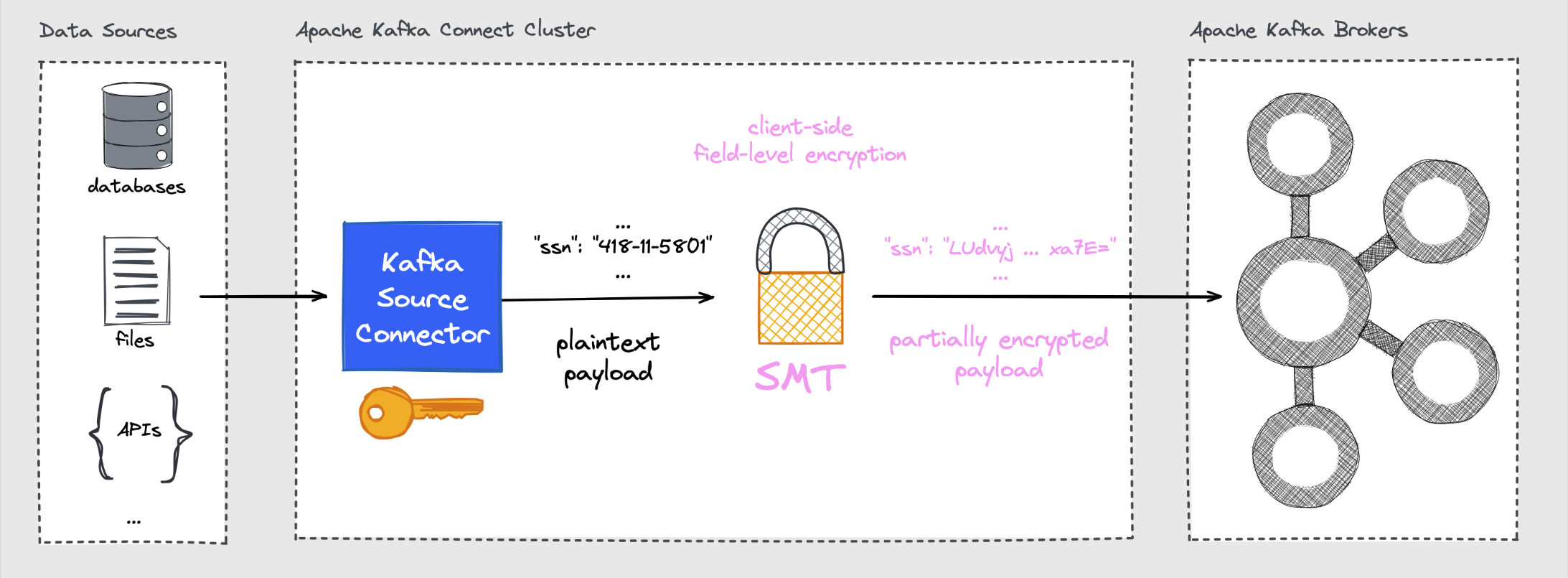
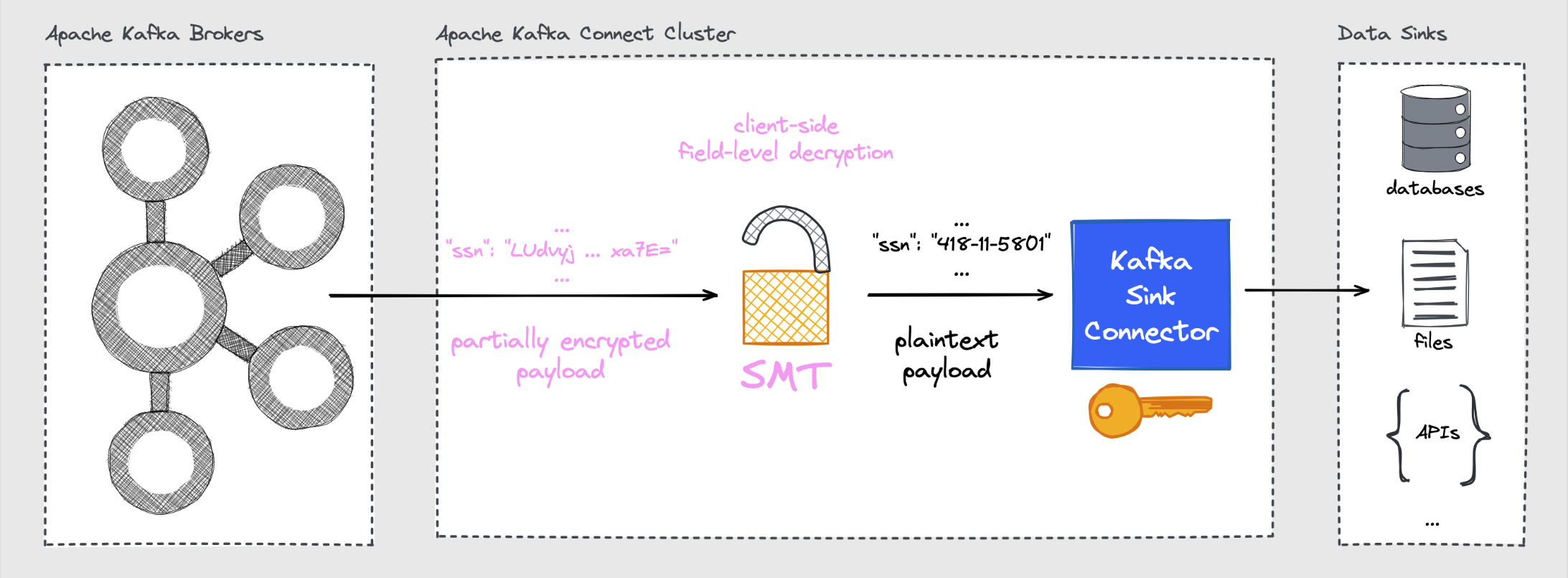
The CipherField Single Message Transformation (SMT) provides field-level encryption and decryption for Kafka Connect source and sink connectors. It works with both schemaless (JSON) and schema-aware (Avro, Protobuf, JSON Schema) records.
Field-Level Encryption with Source Connectors
Field-Level Decryption with Sink Connectors
Installation / Deployment
- Download the ZIP archive from the GitHub Releases page.
- Extract the archive and place the root folder into the configured plugin path of your Kafka Connect deployment.
- (Re)Start the Connect worker(s).
If building from sources:
Basic Usage
The SMT is registered as a transformation on a connector:
{
  "transforms": "cipher",
  "transforms.cipher.type": "com.github.hpgrahsl.kafka.connect.transforms.kryptonite.CipherField$Value"
}
Use CipherField$Value to transform the record value. If you really need to apply the SMT to encrypt/decrypt fields of a record's key you'd choose CipherField$Key instead.
Schemaless records
Encrypt selected fields
Given this JSON record value as input:
{
  "id": "1234567890",
  "myString": "some foo bla text",
  "myInt": 42,
  "myBoolean": true,
  "mySubDoc1": {"myString": "hello json"},
  "myArray1": ["str_1", "str_2", "str_N"],
  "mySubDoc2": {"k1": 9, "k2": 8, "k3": 7}
}
To encrypt the fields named myString, myArray1, and mySubDoc2 you could configure the SMT as follows:
{
  "transforms": "cipher",
  "transforms.cipher.type": "com.github.hpgrahsl.kafka.connect.transforms.kryptonite.CipherField$Value",
  "transforms.cipher.cipher_mode": "ENCRYPT",
  "transforms.cipher.cipher_data_keys": "[{\"identifier\":\"my-key\",\"material\":{\"primaryKeyId\":123456789,\"key\":[{\"keyData\":{\"typeUrl\":\"type.googleapis.com/google.crypto.tink.AesGcmKey\",\"value\":\"<BASE64_KEY>\",\"keyMaterialType\":\"SYMMETRIC\"},\"status\":\"ENABLED\",\"keyId\":123456789,\"outputPrefixType\":\"TINK\"}]}}]",
  "transforms.cipher.cipher_data_key_identifier": "my-key",
  "transforms.cipher.field_config": "[{\"name\":\"myString\"},{\"name\":\"myArray1\"},{\"name\":\"mySubDoc2\"}]",
  "transforms.cipher.field_mode": "OBJECT"
}
The settings in detail:
cipher_mode: "ENCRYPT"runs the SMT in encrypt modecipher_data_keys: "..."specifies the keysets that are available to choose from directly in the configuration. Learn more about other key management options and how to generate your own keysets with the provided keytool.cipher_data_key_identifier": "my-key": specifies the default key identifier to use for encryption operations when no field-level overrides are in place.field_config": "..."defines which payload field(s) should get processed by the SMT. Each field could define overrides for any SMT defaults to influence the SMT's behaviour on field-level. For instance, you can choose a different key identifier and/or a different cipher algorithm for some of the fields.field_mode": "OBJECT"instructs the SMT to process any field value with a complex data type (ARRAY,MAP,STRUCT) in its entirety.
Tip
Per-field keyId values may also be dynamic: if a configured identifier starts with dynamic_key_id_prefix (default __#), the remaining suffix is resolved as a field path against the top-level record at runtime.
The result of applying the SMT with these settings based on the input record value looks like this:
{
  "id": "1234567890",
  "myString": "M007MIScg8F0A/cAddWbayvUPObjxuGFxisu5MUckDhB...",
  "myInt": 42,
  "myBoolean": true,
  "mySubDoc1": {"myString": "hello json"},
  "myArray1": "UuEKnrv91bLImQvKqXTET7RTP93XeLfNRhzJaXVc6OGA...",
  "mySubDoc2": "fLAnBod5U8eS+LVNEm3vDJ1m32/HM170ASgJLKdPF78qDx..."
}
All encrypted fields became Base64-encoded ciphertext. The fields myArray1 and mySubDoc2 have been encrypted as a whole due to OBJECT mode encryption.
Decrypt selected fields
Given the record value input being result of the encryption shown right above:
{
  "id": "1234567890",
  "myString": "M007MIScg8F0A/cAddWbayvUPObjxuGFxisu5MUckDhB...",
  "myInt": 42,
  "myBoolean": true,
  "mySubDoc1": {"myString": "hello json"},
  "myArray1": "UuEKnrv91bLImQvKqXTET7RTP93XeLfNRhzJaXVc6OGA...",
  "mySubDoc2": "fLAnBod5U8eS+LVNEm3vDJ1m32/HM170ASgJLKdPF78qDx..."
}
To decrypt the fields named myString, myArray1, and mySubDoc2 you could configure the SMT as follows:
{
  "transforms": "decipher",
  "transforms.decipher.type": "com.github.hpgrahsl.kafka.connect.transforms.kryptonite.CipherField$Value",
  "transforms.decipher.cipher_mode": "DECRYPT",
  "transforms.decipher.cipher_data_keys": "[{\"identifier\":\"my-key\",\"material\":{\"primaryKeyId\":123456789,\"key\":[{\"keyData\":{\"typeUrl\":\"type.googleapis.com/google.crypto.tink.AesGcmKey\",\"value\":\"<BASE64_KEY>\",\"keyMaterialType\":\"SYMMETRIC\"},\"status\":\"ENABLED\",\"keyId\":123456789,\"outputPrefixType\":\"TINK\"}]}}]",
  "transforms.decipher.field_config": "[{\"name\":\"myString\"},{\"name\":\"myArray1\"},{\"name\":\"mySubDoc2\"}]"
}
The settings in detail:
cipher_mode: "DECRYPT"runs the SMT in decrypt modecipher_data_keys: "..."specifies the keysets that are available to choose from directly in the configuration. Learn more about other key management options and how to generate your own keysets with the provided keytool.field_config": "..."defines which payload field(s) should get processed by the SMT.
The result of applying the SMT with these settings based on the partially encrypted record value is the original plaintext input record value:
{
  "id": "1234567890",
  "myString": "some foo bla text",
  "myInt": 42,
  "myBoolean": true,
  "mySubDoc1": {"myString": "hello json"},
  "myArray1": ["str_1", "str_2", "str_N"],
  "mySubDoc2": {"k1": 9, "k2": 8, "k3": 7}
}
Dynamic key identifiers
The Kafka Connect SMT supports dynamic key identifier resolution for:
- field-level
keyId - default
cipher_data_key_identifier - for
TINK/AES_GCM_ENVELOPE_KMS, defaultenvelope_kek_identifier
When the selected configured identifier starts with dynamic_key_id_prefix (default __#), the remaining suffix is interpreted as a field path and resolved from the input record.
Example:
- configured identifier:
__#customer.region - record field value at
customer.region:EMEA - effective runtime key identifier:
EMEA
For TINK/AES_GCM_ENVELOPE_KMS, the algorithm-aware default fallback is envelope_kek_identifier rather than cipher_data_key_identifier.
Resolution is performed against the top-level record. This works for both schemaless records (Map) and schema-aware records (Struct). If the field path cannot be resolved, resolves to a non-string value, or resolves to a blank string, processing fails.
Schema-aware records
Encrypt selected fields
Schema-aware encryption works with the same configuration as schemaless encryption. The difference is that the SMT will automatically redact the schema accordingly as encrypted fields are always represented as STRING type, regardless of their original type.
Decrypt selected fields
For decryption of schema-aware records, include the schema in each field config entry so the SMT can properly restore the original schema for the field in question when processing the records:
{
  "transforms": "decipher",
  "transforms.decipher.type": "com.github.hpgrahsl.kafka.connect.transforms.kryptonite.CipherField$Value",
  "transforms.decipher.cipher_mode": "DECRYPT",
  "transforms.decipher.cipher_data_keys": "[{\"identifier\":\"my-key\",\"material\":{\"primaryKeyId\":123456789,\"key\":[{\"keyData\":{\"typeUrl\":\"type.googleapis.com/google.crypto.tink.AesGcmKey\",\"value\":\"<BASE64_KEY>\",\"keyMaterialType\":\"SYMMETRIC\"},\"status\":\"ENABLED\",\"keyId\":123456789,\"outputPrefixType\":\"TINK\"}]}}]",
  "transforms.decipher.field_config": "[{\"name\":\"myString\",\"schema\":{\"type\":\"STRING\"}},{\"name\":\"myArray1\",\"schema\":{\"type\":\"ARRAY\",\"valueSchema\":{\"type\":\"STRING\"}}},{\"name\":\"mySubDoc2\",\"schema\":{\"type\":\"MAP\",\"keySchema\":{\"type\":\"STRING\"},\"valueSchema\":{\"type\":\"INT32\"}}}]"
}
Format-Preserving Encryption (FPE)
FPE keeps the original format and length of field values. Configure it per-field via field_config by specifying all necessary FPE-related settings.
Let's imagine a record with sensitive fields:
{
  "customerId": "CUST-12345",
  "creditCardNumber": "4455202014528870",
  "ssn": "230564998",
  "email": "customer@example.com"
}
To encrypt the sensitive fields creditCardNumber and ssn while keeping their numeric format intact you can use the following field_config settings to apply the FPE cipher:
{
  "transforms":"cipher",
  "transforms.cipher.type":"com.github.hpgrahsl.kafka.connect.transforms.kryptonite.CipherField$Value",
  "transforms.cipher.cipher_mode": "ENCRYPT",
  "transforms.cipher.cipher_data_keys": "[{ \"identifier\": \"my-fpe-key\", \"material\": { \"primaryKeyId\": 2000001, \"key\": [{ \"keyData\": { \"typeUrl\": \"io.github.hpgrahsl.kryptonite/crypto.custom.mysto.fpe.FpeKey\", \"value\": \"<BASE64_ENCODED_FPE_KEY>\", \"keyMaterialType\": \"SYMMETRIC\" }, \"status\": \"ENABLED\", \"keyId\": 2000001, \"outputPrefixType\": \"RAW\" }] } }]",
  "transforms.cipher.cipher_data_key_identifier": "my-fpe-key",
  "transforms.cipher.field_config": "[{\"name\":\"creditCardNumber\",\"algorithm\":\"CUSTOM/MYSTO_FPE_FF3_1\",\"fpeAlphabetType\":\"DIGITS\"},{\"name\":\"ssn\",\"algorithm\":\"CUSTOM/MYSTO_FPE_FF3_1\",\"fpeAlphabetType\":\"DIGITS\"}]"
}
After FPE encryption, the 16-digit credit card number remains a 16-digit number and the 9-digit social security number remains a 9-digit number.
{
  "customerId": "CUST-12345",
  "creditCardNumber": "7823956140762231",  // still 16 digits
  "ssn": "845721369",  // still 9 digits
  "email": "customer@example.com"
}
To successfully decrypt both fields you MUST configure the SMT with the exact same FPE settings:
{
  "transforms":"decipher",
  "transforms.decipher.type":"com.github.hpgrahsl.kafka.connect.transforms.kryptonite.CipherField$Value",
  "transforms.decipher.cipher_mode": "DECRYPT",
  "transforms.decipher.cipher_data_keys": "[{ \"identifier\": \"my-fpe-key\", \"material\": { \"primaryKeyId\": 2000001, \"key\": [{ \"keyData\": { \"typeUrl\": \"io.github.hpgrahsl.kryptonite/crypto.custom.mysto.fpe.FpeKey\", \"value\": \"<BASE64_ENCODED_FPE_KEY>\", \"keyMaterialType\": \"SYMMETRIC\" }, \"status\": \"ENABLED\", \"keyId\": 2000001, \"outputPrefixType\": \"RAW\" }] } }]",
  "transforms.decipher.field_config": "[{\"name\":\"creditCardNumber\",\"algorithm\":\"CUSTOM/MYSTO_FPE_FF3_1\",\"fpeAlphabetType\":\"DIGITS\"},{\"name\":\"ssn\",\"algorithm\":\"CUSTOM/MYSTO_FPE_FF3_1\",\"fpeAlphabetType\":\"DIGITS\"}]"
}
The result of a successful decryption shows the original record value:
{
  "customerId": "CUST-12345",
  "creditCardNumber": "4455202014528870",
  "ssn": "230564998",
  "email": "customer@example.com"
}
Externalising Key Material
Since keyset material that is inlined into the connector's JSON configuration is visible via the Connect REST API, use the file-based config provider to keep secrets such as keysets outside of the connector configuration.
1. Add to the Connect worker configuration:
connect.config.providers=file
connect.config.providers.file.class=org.apache.kafka.common.config.provider.FileConfigProvider
2. Create a properties file on each worker node (e.g. /secrets/kryptonite/classified.properties):
3. Reference it in the connector config:
{
  "transforms.cipher.cipher_data_keys": "${file:/secrets/kryptonite/classified.properties:cipher_data_keys}"
}
Configuration Reference
See the full Configuration Reference for all parameters.
Core parameters:
| Parameter | Description |
|---|---|
cipher_mode |
ENCRYPT or DECRYPT |
cipher_data_keys |
JSON array of keyset objects |
cipher_data_key_identifier |
Default key identifier for encryption |
field_config |
JSON array of field names (and optional per-field overrides) |
field_mode |
OBJECT or ELEMENT |
path_delimiter |
Nested field separator for field_config and dynamic key identifier paths |
dynamic_key_id_prefix |
Prefix that marks key identifiers as field-path expressions to resolve dynamically |
key_source |
CONFIG, CONFIG_ENCRYPTED, KMS, or KMS_ENCRYPTED |
cipher_algorithm |
TINK/AES_GCM (default), TINK/AES_GCM_SIV, CUSTOM/MYSTO_FPE_FF3_1 |